Fiber Laser Marker Selection Guide: Choosing the Right WDOTMARK Model
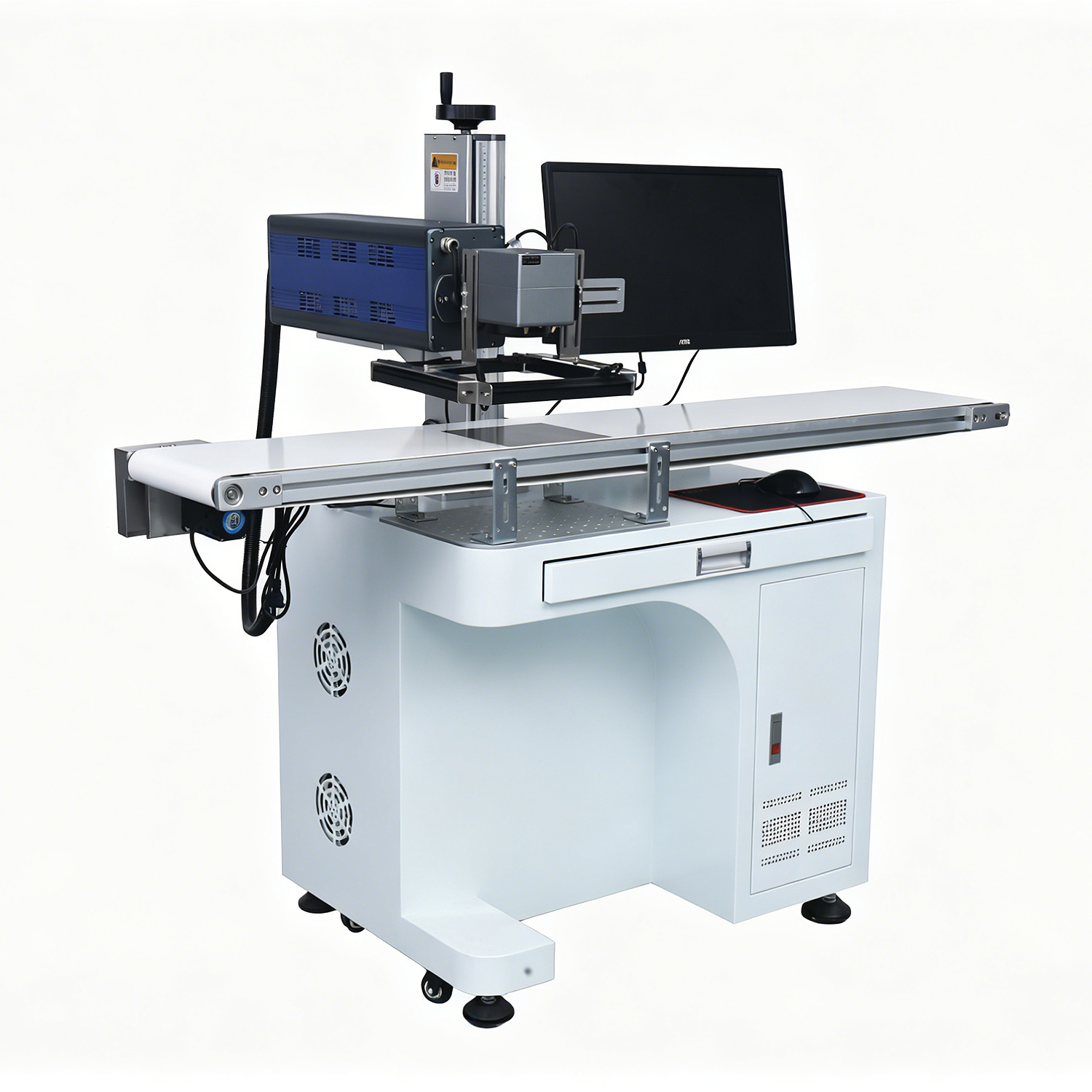
A fiber laser marker is a long-term capital purchase, and for most buyers the hardest question is not whether to buy one but which configuration fits the line. WDOTMARK builds a fiber laser marking machine lineup that runs from a 20W desktop unit for job-shop work up to a 100W flying system for high-throughput production. This guide walks through the models, the materials they handle, and the power and format decisions that matter when you specify a unit for metal marking, engraving, or thin-material cutting.
WDOTMARK Fiber Laser Marking Machine Lineup
The range is organized by how the laser reaches the workpiece: stationary desktop and portable units for batch work, handheld units for large or immovable parts, and flying models integrated into a conveyor line.
- T-F20–100 desktop / portable series — 20W to 100W, covering general metal marking, deeper engraving, and faster cycle times on the same footprint.
- T-F20 portable — a compact 20W unit for workshops that need to move the marker to the part rather than the reverse.
- T-F50 with CCD vision positioning — 50W output with camera-based positioning for small parts, multi-position fixtures, and jobs where manual alignment costs more than the marking itself.
- Handheld 20W fiber laser — a 20W handheld unit, with 30W and 50W options available, for large or fixed workpieces that cannot be moved onto a bench.
- YT-F30 online flying fiber laser — 30W flying configuration for marking on a moving production line.
- MIC flying fiber 30W / 50W / 100W — higher-power flying units for lines that need more speed or deeper marks at production rates.
Flying fiber models are typically specified together with custom integration hardware, which is why they are often quoted as part of a complete /laser-marking-systems/ project rather than as a standalone unit. For handheld work, the dedicated /handheld-laser-marking-machine/ page covers the portable configuration in more detail.
Materials & Capabilities
Fiber lasers at 1064nm are absorbed well by most metals, which is why the lineup is specified mainly for metal marking and engraving.
- Metals — stainless steel, aluminum, and copper are standard. Fiber marking is common for tools, hardware, nameplates, valves, and machined components.
- Some plastics — certain plastics mark acceptably; material samples should be tested before committing to a specification.
- Thin-material cutting — thin sheet can be cut in addition to marked, though cutting is a secondary capability rather than the primary design intent.
For reference on what the hardware delivers at the entry power level, the handheld 20W specification illustrates the class of performance: 1064nm wavelength, marking speed up to 7000mm/s, a 100×100mm marking area, air cooling, marking depth up to 2mm, 500W power consumption, and single-phase input at 220V-50Hz or 110V-60Hz.
If your production runs non-metals such as cartons, film, or packaging, a different source wavelength is the better answer — see /co2-laser-marking-machine/ for the CO2 route and /uv-laser-marking-machine/ for plastics, glass, and bottles.
How to Choose the Right Power
Power selection is a trade-off between depth, speed, and budget. Moving up the range does not automatically improve results; it changes what the system can do within a given cycle time.
- 20W — marking and light engraving on metal, thin coatings, and general identification work. Suitable for job shops, low-volume production, and mixed-part batches.
- 30W–50W — the working range for most industrial marking. Faster marking, better depth control on stainless steel, and headroom for production throughput. The T-F50 adds CCD vision positioning at 50W, which is the practical choice when parts are small or loaded in multiple positions.
- 100W — specified for deep engraving, high-speed flying lines, and heavier material removal. The MIC flying fiber 30W/50W/100W series and the T-F20–100 desktop range both reach this power level.
Match the marking area to the largest part you will process; the standard handheld configuration uses a 100×100mm field, and larger formats are quoted per application. Confirm cooling and electrical requirements before installation — air cooling and single-phase input keep installation simple on most shop floors.
Two practical checks before ordering: send a sample of your actual material, and confirm the required cycle time per part rather than the marking speed alone. Cycle time is what determines whether a 20W unit keeps up or whether the line needs a flying model.
Request a Free Marking Test
The most reliable way to specify a fiber laser marker is to test your own material. WDOTMARK supplies units from 1 unit, confirmed on inquiry, with delivery up to 15 days and certificates available upon request. As an SGS-audited and MIC Diamond Member supplier based in Guangzhou, China, we ship to the Middle East.
Send your material sample and requirements to sales@fiberlasermarker.com or message WhatsApp +86 193 0303 6632, and our engineers will recommend the model and power level for your application. You can also review the full range on the /fiber-laser-marking-machine/ overview or start from the / homepage.